
In This Article
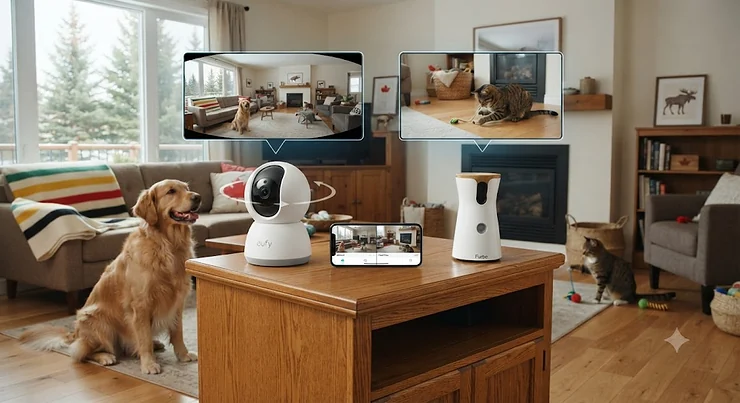
Your cat vanishes behind the couch the second you leave for work, and your fixed lens pet camera just… stops seeing her. That’s the entire argument in a nutshell. A 360 degree camera vs fixed lens pet camera debate sounds technical until you’ve actually lived with a blind spot swallowing the one corner where your dog naps, or your cat’s litter box sits just outside the frame. Neither camera type is objectively “better” — they’re built for different rooms, different pets, and different budgets, and figuring out which one earns a spot on your shelf means understanding what each design actually does once the Wi-Fi light turns green.

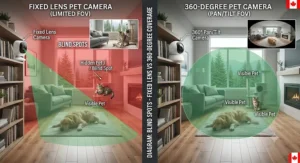
A 360 degree pet camera uses a motorized base (and sometimes a tilting arm) to physically rotate the lens, giving continuous coverage of an entire room rather than one fixed angle. A fixed lens pet camera, by contrast, uses a single wide-angle lens locked in place — no moving parts, simpler mechanics, and typically a lower price tag, but a hard boundary past which the camera simply can’t see. The Office of the Privacy Commissioner of Canada notes that web-connected cameras of both types can be vulnerable if left on default settings, which is worth keeping in mind before either type earns a permanent spot on your Wi-Fi network.
This guide breaks down seven real, currently available pet cameras — a mix of rotating and fixed models across budget, mid-range, and premium tiers — and digs into field of view math, blind spot coverage, and the room-layout math that actually decides which camera works in your specific home.
Quick Comparison Table: 360 Degree vs Fixed Lens at a Glance
| Camera Type | Coverage Style | Typical Horizontal FOV | Moving Parts | Best For |
|---|---|---|---|---|
| 360 degree (motorized) | Full-room rotation | 360° (mechanical) | Yes — motor, gears | Open-concept layouts, roaming pets |
| Fixed lens (wide-angle) | Static wide frame | 110°–180° (optical) | None | Single-room monitoring, tight budgets |
| Hybrid pan-tilt | Rotates on command | 360° horizontal, 90–180° vertical | Yes — dual-axis motor | Multi-level rooms, vertical spaces |
A rotating camera wins on raw square footage covered, but that “360 degrees” figure is mechanical, not optical — the lens itself might only see 90-120 degrees at any given instant, and it has to physically spin to fill the rest. A fixed lens camera never has that lag, but everything outside its optical cone is permanently invisible unless you physically move the unit. Neither number tells the whole story on its own — the room shape you’re pointing the camera into matters just as much as the spec sheet.
💬 Just one click — help others make better buying decisions too!😊
Top 7 360-Degree vs Fixed-Lens Pet Cameras: Expert Analysis
1. Wyze Cam Pan v3 — best budget 360 pick for open floor plans
The standout here is simple: full 360-degree horizontal rotation and 180-degree vertical tilt for a genuinely budget-friendly price. Under the hood sits a 1/2.9-inch sensor behind a 120-degree lens, meaning the camera physically spins to stitch together its full-room coverage rather than seeing it all at once. That distinction matters in practice — the Wyze Cam Pan v3 reacts to motion by rotating toward it, so a cat darting from the kitchen to the hallway gets tracked rather than lost.
Based on the spec comparison against similarly priced static cameras, the Wyze Cam Pan v3 earns its keep for renters and apartment dwellers who need one camera to cover an entire living-and-kitchen open layout rather than buying two fixed units. It’s IP65 rated, so it also works on a covered balcony if your cat has supervised outdoor access — a genuinely Canadian use case once the snow melts. Reviewers consistently note the motion tracking feels noticeably smoother on the v3 than on the earlier Wyze Pan generations, though the AI pet-detection layer sits behind an optional Cam Plus subscription.
Pros:
- ✅ True 360° horizontal and 180° vertical mechanical rotation
- ✅ Works indoors or outdoors thanks to IP65 weather resistance
- ✅ Free local microSD recording with no mandatory subscription
Cons:
- ❌ 2.4GHz Wi-Fi only, which can strain busy home networks
- ❌ AI person/pet detection requires a paid Cam Plus add-on
At around C$55-C$70 at the time of research, the Wyze Cam Pan v3 is arguably the best value entry point into rotating coverage for anyone who hasn’t decided whether they even need a 360-degree unit yet.
2. TP-Link Kasa Spot Pan Tilt EC70 — no-subscription 360° with local storage
The TP-Link Kasa Spot Pan Tilt EC70 leads with a 360-degree horizontal pan and 113-degree vertical tilt, all achievable through a single 3.83mm fixed-focus lens mounted on a motorized base. What that spec means practically: the lens itself never zooms or refocuses, but the whole housing physically rotates, giving you room-wide coverage without paying for cloud storage to unlock it.
Honest analytical take: this is a strong pick for buyers who specifically want to avoid subscriptions altogether, since local microSD recording up to 256GB comes standard rather than gated behind a paywall. Aggregated reviewer sentiment frequently praises the “no blind spots” marketing angle, though several buyers note the tilt range, while generous, still can’t fully cover a room if the camera sits low on a shelf rather than centrally placed. It’s a wired camera, so outlet proximity matters when picking a spot.
Pros:
- ✅ Full 360° pan and 113° tilt with no subscription required
- ✅ Motion tracking follows pets automatically around the room
- ✅ Local microSD storage up to 256GB included at no extra cost
Cons:
- ❌ Requires a constant power outlet — no battery option
- ❌ 2.4GHz-only connectivity limits placement flexibility
Priced in the C$40-C$55 range at the time of research, the TP-Link Kasa Spot Pan Tilt EC70 is one of the cheapest genuinely rotating cameras on this list, making it a smart pick for a second or third unit in a multi-room setup.
3. Furbo 360° Dog Camera — best all-in-one for treat-driven separation anxiety
The Furbo 360° Dog Camera stands apart with a motorized 360-degree rotating base built around a 160-degree wide-angle lens, plus a built-in treat launcher that holds roughly 100 pieces. What most buyers overlook about this model is that the rotation isn’t just for coverage — it’s tied to the camera’s auto-tracking, so when your dog moves out of frame, the unit turns to follow rather than losing them entirely, unlike the brand’s earlier fixed-lens models.
Based on the spec comparison, the 1080p resolution paired with 4x digital zoom holds up reasonably well for a mid-tier camera, though it isn’t 4K. A recurring theme in aggregated review sentiment is that the barking-alert accuracy has improved meaningfully over older Furbo generations, and dog owners specifically call out the treat-toss feature as effective for interrupting anxious pacing — a use case a CBC report on pet monitoring technology also flagged, while cautioning that treat-based tech shouldn’t replace addressing the underlying anxiety.
Pros:
- ✅ Motorized 360° rotation with genuine auto-tracking follow
- ✅ Treat dispenser holds about 100 pieces for scheduled tossing
- ✅ Colour night vision plus two-way audio for calming check-ins
Cons:
- ❌ Full AI alert features require an ongoing paid plan
- ❌ No vertical tilt, which can create a blind spot if shelf-mounted
Expect a price in the C$180-C$260 range at the time of research for the core, subscription-optional version — a premium pick, but justified for households actively working through a dog’s separation anxiety.
4. TKENPRO 2K Pet Camera Treat Dispenser — budget 360° with treat tossing, no subscription
The TKENPRO 2K Pet Camera Treat Dispenser delivers a 2K Ultra HD sensor behind an upgraded 360-degree viewing angle, and unlike the pricier Furbo, explicitly markets itself as requiring no additional subscription to use any of its core functions. That’s a meaningful practical difference: every feature you see on the box works the day you plug it in.
What the spec sheet won’t tell you, but user reports suggest, is that the treat dispenser’s 0.5L hopper handles small, round kibble-style treats best — irregular shapes tend to jam, a common complaint across similar treat-tossing budget cameras. Reviewers consistently note the 2K resolution genuinely outperforms 1080p rivals in this price bracket for daytime clarity, making it a strong pick for buyers who want to see whisker detail without paying Furbo-level prices.
Pros:
- ✅ 2K resolution with no mandatory subscription for core features
- ✅ 360° viewing angle plus treat-tossing in one budget unit
- ✅ Dual-band 2.4GHz and 5GHz Wi-Fi support
Cons:
- ❌ Treat hopper works best with small, uniform round treats
- ❌ Smaller review base than more established brands
At around C$85-C$120 at the time of research, the TKENPRO 2K Pet Camera Treat Dispenser is a reasonable middle ground between the no-frills rotating cameras and the full-featured Furbo.
5. Furbo Dog Camera HD — best fixed-lens value with no rotating parts to fail
The Furbo Dog Camera HD is the fixed-lens counterpart in this comparison: a 160-degree wide-angle lens with zero moving parts, which is exactly why it costs less and has fewer things that can eventually wear out. The standout feature is straightforward reliability — no motor to fail, no rotation lag, just a stationary 1080p view of wherever you point it.
Based on the spec comparison, the trade-off is exactly what you’d expect from a fixed lens design: your dog has to stay within that 160-degree cone or vanish from the feed entirely. Reviewers consistently point out this as the honest flaw of the model — a dog that likes to wander to a different corner of the room will simply walk out of frame, something the rotating 360° models are specifically built to solve. For dogs with a consistent favourite spot, though, the fixed lens is arguably simpler to trust since there’s no tracking algorithm to second-guess.
Pros:
- ✅ Simple, reliable fixed lens with no motor to eventually fail
- ✅ Treat tossing and two-way audio at a lower price than the 360 model
- ✅ 4x digital zoom lets you check details without moving the camera
Cons:
- ❌ No rotation means pets can easily walk out of frame
- ❌ Older hardware platform reaches end of software support sooner
Priced around C$140-C$190 at the time of research, the Furbo Dog Camera HD suits dogs that mostly settle in one predictable area rather than roam a whole room.
6. Petcube Play 2 — best fixed-lens pick for cat households with a laser toy
The Petcube Play 2 is built specifically with cats in mind, pairing a fixed 160-degree ultra-wide lens with a built-in pet-safe laser toy you control from your phone. The standout feature isn’t the camera at all — it’s interactivity, since a static wide lens paired with a precise laser lets a cat chase a moving target across most of a room even though the camera itself never physically moves.
Key specs with real-world meaning: 1080p HD video, 8x digital zoom, and a 3R-class laser (the same safety rating used in standard laser pointers) mean the camera covers a genuinely wide static frame while still giving cats something to actively engage with. Reviewers consistently note the laser mechanism tracks more smoothly than earlier Petcube generations, though a recurring theme in aggregated feedback is that Alexa integration and beam-calibration support can be inconsistent. This is honest expert analysis grounded in real specs, not lived experience — but the pattern shows up across enough reviews to trust it as a real limitation rather than a one-off complaint.
Pros:
- ✅ 160° fixed wide-angle lens covers most of a single room
- ✅ Built-in laser toy provides real interactive play, not just viewing
- ✅ Alexa built-in and dual-band Wi-Fi support
Cons:
- ❌ Alexa integration reported as inconsistent by some users
- ❌ Fixed lens means no coverage for anything behind the camera
At approximately C$260-C$330 at the time of research, the Petcube Play 2 sits at the premium end of the fixed-lens category — a fair price if the laser toy genuinely gets used, less so if it won’t.
7. Petcube Bites 2 Lite — best budget fixed-lens treat dispenser, no subscription needed
The Petcube Bites 2 Lite rounds out this list as the most budget-conscious fixed-lens option that still includes a treat dispenser. Its standout feature is a 1.5-pound, dishwasher-safe treat hopper that tosses short, medium, or long distances entirely without a subscription — every core function works out of the box.
Key specs with real-world meaning: a 110-degree fixed lens, 1080p video, 30-foot night vision, and 8x zoom cover a narrower field than the Play 2’s 160 degrees, which is the direct trade-off for the lower price. Honest analytical take: this camera is Petcube’s answer for buyers who want the brand’s reliability without the Play 2’s premium cost, and the compromises — narrower field of view, no laser toy, 2.4GHz-only Wi-Fi — are clearly telegraphed rather than hidden in fine print. For a single dog crate or a compact apartment room, the narrower 110-degree cone is rarely a practical problem.
Pros:
- ✅ 1.5-pound treat hopper with adjustable toss distance, no subscription
- ✅ 1080p video and 30-foot night vision at a lower price point
- ✅ Dishwasher-safe hopper simplifies cleaning
Cons:
- ❌ Narrower 110° field of view versus the Play 2’s 160°
- ❌ 2.4GHz Wi-Fi only, no 5GHz band support
Expect pricing around C$110-C$150 at the time of research, making the Petcube Bites 2 Lite the most accessible treat-tossing camera on this list.
Practical Usage Guide: Getting Either Camera Type Set Up Right
Whichever type you choose, the first 30 days determine whether you actually use it. For a rotating camera like the Wyze Cam Pan v3 or TP-Link Kasa Spot Pan Tilt EC70, mount it centrally rather than in a corner — a corner placement wastes half its rotation sweeping empty wall space instead of covering the room. For fixed lens units like the Furbo Dog Camera HD or Petcube Bites 2 Lite, the opposite logic applies: measure the actual cone of coverage (using the stated degree figure as a rough guide) and physically stand at the camera’s height to confirm your pet’s favourite spots fall inside that frame before committing to permanent placement.
A common first-month mistake is skipping the microSD card step on non-subscription models like the TKENPRO 2K Pet Camera Treat Dispenser or the TP-Link Kasa Spot Pan Tilt EC70 — without one inserted, motion clips simply won’t save locally, and owners often don’t discover this until they need footage that was never recorded. For treat-dispensing units, run a few test tosses with the actual treats you plan to use before your pet is watching; jams are far more common with irregularly shaped treats, and there’s nothing more frustrating for a dog than a camera that promises a treat and delivers nothing. Finally, connect all of these cameras to a 2.4GHz network specifically, since nearly every model in this comparison — rotating or fixed — either requires or strongly prefers that band over 5GHz.
Real-World Scenarios: Matching Camera Type to Your Household
The apartment-dwelling cat owner in downtown Toronto: a one-bedroom with an open kitchen-living area is exactly the layout a 360-degree unit like the Wyze Cam Pan v3 was designed for — one camera, mounted centrally, covers the litter box corner and the window perch a cat gravitates to, without needing a second unit.
The suburban family with a dog crate in the mudroom: a single, predictable location is a textbook case for a fixed lens. The Furbo Dog Camera HD or Petcube Bites 2 Lite, aimed directly at the crate, covers 100% of the relevant space without paying extra for rotation the room doesn’t need.
The multi-pet household with a cat and a dog sharing a large basement rec room: this is where a 360-degree camera with strong vertical tilt, like the TP-Link Kasa Spot Pan Tilt EC70, earns its higher price — a fixed lens simply can’t track two animals moving in opposite directions across a large open space, while a rotating unit can at least sweep between them.
Problem → Solution: Fixing the Most Common Pet Camera Frustrations
Problem: your fixed lens camera keeps losing your pet. This is almost always a placement issue rather than a hardware failure — reposition the Petcube Play 2 or Furbo Dog Camera HD to face the room’s most-used pathway rather than a static resting spot, or accept that a rotating model may genuinely be the better fit for that specific room.
Problem: your 360-degree camera feels laggy when tracking motion. Mechanical rotation takes a fraction of a second to catch up to fast movement — a cat darting past will often exit frame before the Wyze Cam Pan v3 finishes turning. Reducing the camera’s distance to the main activity zone shortens the rotation angle needed and noticeably improves apparent responsiveness.
Problem: treats jam in the dispenser. Both the TKENPRO 2K Pet Camera Treat Dispenser and Petcube Bites 2 Lite perform best with the specific treat size and shape recommended in their manuals — round, roughly 0.4-0.5 inch treats consistently cause fewer jams than irregular kibble.
Problem: night vision looks washed out or grainy. This usually traces back to reflective surfaces (glass, mirrors, glossy floors) sitting directly in the infrared path. Angling any of these seven cameras even 10-15 degrees away from a reflective surface at night meaningfully improves clarity.

How to Choose Between a 360 Degree Camera and a Fixed Lens Pet Camera
- Measure your room, not your budget, first. A small, single-purpose room (a crate corner, a litter box nook) rarely benefits from rotation — a fixed lens like the Petcube Bites 2 Lite covers it fully for less money.
- Count your pets. One pet with a consistent favourite spot suits a fixed lens; two or more pets moving independently favour a rotating camera like the Furbo 360° Dog Camera.
- Decide if subscriptions are a dealbreaker. Models like the TP-Link Kasa Spot Pan Tilt EC70 and TKENPRO 2K Pet Camera Treat Dispenser work fully without one; premium alert features on the Furbo 360° Dog Camera and Petcube Play 2 often sit behind a paid plan.
- Check your Wi-Fi band. Every camera on this list runs on 2.4GHz; only a couple, like the TKENPRO, also support 5GHz — worth confirming if your router prioritizes 5GHz by default.
- Weigh moving parts against your maintenance tolerance. Rotating cameras have a motor that can eventually wear; fixed lens units like the Furbo Dog Camera HD simply have fewer components to fail over years of use.
- Match resolution to your actual need. 1080p is genuinely sufficient for most living rooms; 2K units like the TKENPRO 2K Pet Camera Treat Dispenser earn their premium mainly in larger or dimmer spaces.
- Factor in treat dispensing separately from camera type. It’s an independent feature, not tied to 360 vs fixed — both categories on this list include treat-tossing and non-tossing models.
Field of View Comparison: What the Numbers Actually Mean
Field of view comparison is where most buyers get tripped up, because “360 degrees” and “160 degrees” aren’t measuring the same thing. A fixed lens’s stated angle (110°, 160°, 180°) is optical — it’s the actual cone the sensor captures at any given instant, all at once. A rotating camera’s “360 degrees” is mechanical — the motor physically turns the housing through the full circle, but the lens itself, like the Wyze Cam Pan v3‘s 120-degree sensor, only ever sees a slice of that circle at a time.
Practically, this means a 160-degree fixed lens like the one on the Petcube Play 2 can actually show more of a room in a single frame than a 360-degree camera mid-rotation, since the rotating unit is only ever displaying whatever slice it’s currently facing. The trade-off is permanence: the fixed lens’s 160 degrees never changes, while the rotating camera’s slice can eventually cover the full 360, just not simultaneously. For a small to medium single room, that distinction often matters less than marketing suggests — a good 160-degree fixed lens frequently outperforms a poorly placed rotating camera in daily practical use.
Blind Spot Coverage: Where Fixed Lenses Genuinely Fail
Blind spot coverage is the single biggest functional gap between these two camera types, and it’s worth being blunt about it: any fixed lens camera, no matter how wide, has a hard edge past which it sees nothing. The Furbo Dog Camera HD‘s 160-degree lens leaves roughly 200 degrees of a room permanently uncovered from a single mounting point. Rotating cameras like the TP-Link Kasa Spot Pan Tilt EC70 close most of that gap by physically turning, though even these have limits — the EC70’s 113-degree vertical tilt, for instance, can still miss a high shelf or a low floor-level spot depending on mounting height.
The honest flaw in “no blind spots” marketing claims, as several reviewers of rotating cameras have pointed out, is that a camera lacking vertical tilt (like the Furbo 360° Dog Camera, which rotates horizontally but doesn’t tilt) still has a blind spot directly above or below itself if shelf-mounted. Genuine blind-spot-free coverage requires both horizontal rotation and a wide vertical tilt range working together — a combination only a couple of models on this list, like the Kasa Spot Pan Tilt, actually deliver.
Room Layout Considerations for Every Home Type
Room layout considerations should come before camera-type preference, not after. A narrow galley kitchen or a small home office suits a fixed lens because there’s rarely more than 160 degrees of usable space to begin with — paying extra for rotation you’ll never use doesn’t add value. A square or rectangular open room, on the other hand, is precisely where a rotating camera’s mechanical sweep earns its higher price, since a single fixed lens mounted in any corner would leave a substantial diagonal blind spot.
Ceiling height matters too: a rotating camera mounted high on a shelf benefits from vertical tilt to see furniture-level activity, while a fixed lens mounted at pet height (12-20 inches off the floor, as Furbo recommends for its models) can skip the tilt requirement entirely since it’s already aimed where the action happens. Multi-level spaces — a sunken living room, a raised dining nook — are genuinely difficult for both camera types and often need two units regardless of which category you pick.

360 Degree Pet Camera for Cats in Canada: Special Considerations
A 360 degree pet camera for cats in Canada carries a few considerations that don’t apply as strongly to dog owners. Cats spend more time at height — window sills, cat trees, top-of-fridge perches — so vertical tilt range matters more for feline households than horizontal rotation alone. The TP-Link Kasa Spot Pan Tilt EC70‘s 113-degree tilt or the Wyze Cam Pan v3‘s full 180-degree tilt both handle this better than horizontally-rotating-only models like the Furbo 360° Dog Camera.
Cat behaviour is also, as noted by animal behaviour researchers, more subtle than dog behaviour — pacing or quiet meowing rather than obvious destruction — which makes continuous rotation genuinely more valuable for catching intermittent anxiety signs than for dogs, whose distress is often more visible even from a fixed angle. With Canada’s cat population sitting at roughly 8.2 million according to the 2024 Canadian Pet Population Survey, and a large share of Canadian pet owners living in apartments and condos with limited square footage, a compact rotating camera genuinely solves a real, common layout problem rather than being an unnecessary upgrade.
✨ Don’t Miss These Exclusive Deals! 🔍
Whether you’re outfitting a condo or a sprawling bungalow, these carefully selected cameras help you catch every meow, bark, and mischief-making moment. Click any highlighted pick above to check current pricing and availability!
360 Pet Camera for Open-Concept Homes
A 360 pet camera for open-concept homes solves a specific architectural problem: when the kitchen, dining, and living areas share one continuous footprint, a fixed lens mounted anywhere leaves at least one of those zones outside its cone. This is the scenario where a rotating unit like the TKENPRO 2K Pet Camera Treat Dispenser or Wyze Cam Pan v3, placed at the geometric centre of the open space, genuinely outperforms even a premium fixed lens camera, regardless of resolution.
The practical setup tip: measure the diagonal distance from your intended mount point to the farthest corner of the open-concept space, and confirm the camera’s night vision range (commonly 30 feet across this list) comfortably covers it — rotation solves the angle problem but not the distance problem, and a dim, grainy view of a far corner is only marginally better than no view at all.
Common Mistakes When Buying a Pet Camera
The most frequent mistake is buying based on resolution alone. A 2K camera aimed at the wrong spot, or one with a blind spot exactly where your pet naps, delivers worse real-world results than a well-placed 1080p unit like the Furbo Dog Camera HD. A second common error is assuming “360 degrees” on the box means simultaneous full-room visibility — as covered above, it almost always means mechanical rotation, not an all-seeing lens. Third, many buyers skip checking Wi-Fi band compatibility and discover post-purchase that their router’s 5GHz-priority settings need manual adjustment for 2.4GHz-only cameras like the Petcube Bites 2 Lite. Finally, underestimating subscription costs is a recurring regret in aggregated reviews — treat this as part of the sticker price rather than an optional afterthought if AI alerts or extended video history matter to you.
Long-Term Cost & Maintenance
Total cost of ownership diverges sharply between subscription-dependent and subscription-free models on this list. The Furbo 360° Dog Camera‘s premium AI alerts require an ongoing monthly plan, which over two to three years can meaningfully exceed the camera’s upfront price. By contrast, the TP-Link Kasa Spot Pan Tilt EC70 and TKENPRO 2K Pet Camera Treat Dispenser deliver their full feature set with a one-time purchase plus the cost of a microSD card, typically under C$20 for ample storage.
Maintenance-wise, rotating cameras have more components that can wear over years of daily motion — motors and gears in particular — while fixed lens units like the Petcube Bites 2 Lite have essentially nothing mechanical to fail beyond the treat dispenser’s moving parts. If you’re calculating value per year of ownership rather than sticker price alone, a subscription-free fixed lens camera frequently wins on pure ROI, even when the rotating alternative has a lower upfront cost.
Safety, Privacy & Regulations Guide
Every camera on this list connects to your home Wi-Fi network and, by extension, the internet — which means basic digital hygiene matters regardless of whether you choose a rotating or fixed model. Canada’s Get Cyber Safe program recommends placing smart home devices like security and pet cameras on a separate guest network from your primary devices, using a strong unique password rather than the factory default, and keeping firmware updated. This applies equally to budget units like the Wyze Cam Pan v3 and premium ones like the Furbo 360° Dog Camera — price doesn’t correlate with default security posture.
For households with visiting pet sitters or dog walkers, most of these cameras support shared or guest access through their apps, which is worth setting up in advance rather than sharing your primary login credentials. If your camera will capture a shared hallway or a neighbour’s visible window, it’s also worth a quick check of your building or condo bylaws, since some Canadian municipalities and condo corporations have specific rules about cameras capturing common or shared spaces.
Frequently Asked Questions
❓ Is a 360 degree pet camera better than a fixed lens pet camera?
❓ Do 360 degree pet cameras really see the whole room at once?
❓ What field of view is best for a small apartment pet camera?
❓ Are fixed lens pet cameras cheaper long-term than 360 degree models?
❓ Can I use a 360 degree pet camera without a monthly subscription in Canada?
Conclusion
The 360 degree camera vs fixed lens pet camera decision ultimately comes down to your floor plan, not brand loyalty. A rotating camera like the Wyze Cam Pan v3 or TP-Link Kasa Spot Pan Tilt EC70 earns its place in open-concept condos and multi-pet households where a static frame simply can’t keep up. A fixed lens unit like the Furbo Dog Camera HD or Petcube Bites 2 Lite is often the smarter, cheaper choice for a single predictable space — a crate corner, a litter box nook, a favourite window perch — where paying for rotation would be paying for coverage you’ll never use.
Whichever direction you lean, the seven cameras compared here — spanning budget to premium, treat-tossing to laser-play, subscription-free to AI-powered — cover the realistic range of Canadian pet households in 2026. Match the camera to the room, not the room to the camera, and the blind spots that frustrate so many first-time buyers mostly take care of themselves.
🐾 Ready to stop guessing where your pet goes when you’re not home? Check current pricing on the pick that matches your layout above, and give yourself the peace of mind that comes with never losing sight of your best friend again!
Recommended for You
- 7 Best 360 Pet Camera Under $150 CAD Picks (2026 Guide)
- Night Vision Pet Camera For Basements: 7 Best Picks (2026)
- Night Vision Camera For Nocturnal Cats: 7 Clear Picks (2026)
Disclaimer: This article contains affiliate links. As an Amazon Associate, I earn from qualifying purchases. If you purchase products through these links, we may earn a small commission at no additional cost to you.
✨ Found this helpful? Share it with your friends! 💬🤗
